Placement Kit
LibraryFit accessories to your character with live sliders, then paste the baked offsets into your code.

thumb_up
1
open_in_new
View on sbox.game
Placement Kit
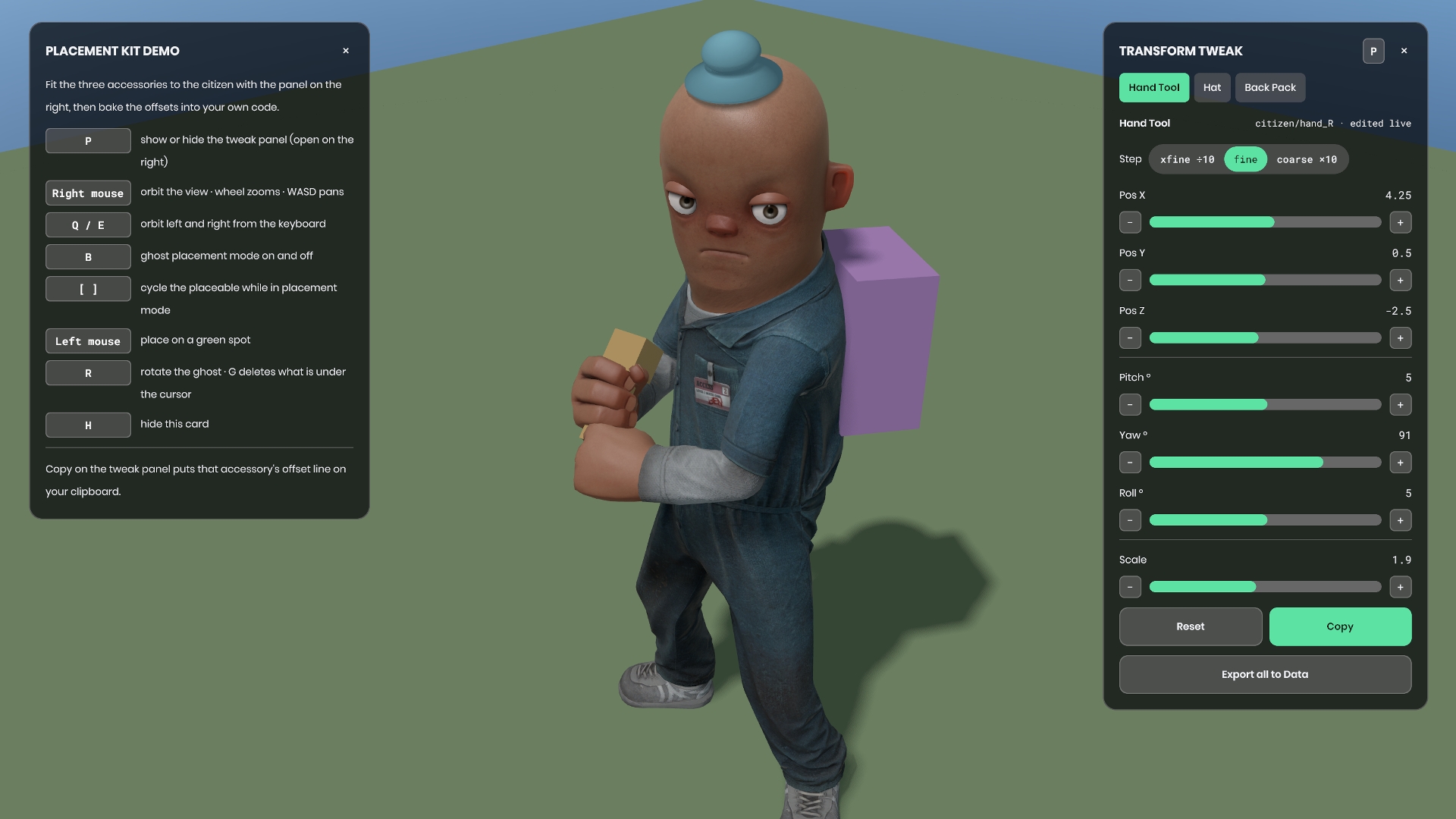
Anything that hangs off a bone or an attachment needs an offset: a position, a rotation, a scale. Guessing those numbers in a text editor costs a recompile per nudge. This kit gives you sliders in the running game and a Copy button that hands you the finished line, with the frame it was measured against named in the comment above it. Paste the line into your project, call ApplyTo on it, and the accessory sits where you put it.
Mounts resolve by model attachment name first (hold_R, hat), then by bone name (hand_R, spine_2), and fall back to the character root, so a renamed attachment never leaves you staring at an empty screen. The step toggle sets what the plus and minus buttons are worth: xfine divides the row's step by ten, coarse multiplies it, which on accessories is 0.025, 0.25 and 2.5 units. Reset returns a target to the transform it had when you registered it, not to zero.
The second half is scene authoring. Press B for ghost placement: props follow your aim, green where your own validity check allows them, and land as world-space placements. Export writes both populations at once, the character-relative offsets and the world placements, as JSON and as a paste-ready C# block.
The demo scene opens on a dressed citizen with a tool in the right hand, a hat on the head and a pack on the spine. To find it after install: in the Asset Browser select Everything and search placement_demo, or walk the sidebar to Libraries, fieldguide.placement, Assets, scenes. All three accessories are bone mounts re-pinned every frame, so they ride the idle animation instead of sliding with the root, and the tweak panel is already open because fitting them is what the scene is for. Every model it uses ships with the engine, so you need no art to start. Press P for the panel, B for placement, H to hide the key card.
Requirements: the kit reads two stock engine actions, attack1 to place and attack2 to orbit. A fresh s&box template project already has both and you have nothing to do. If your project's Input.config was trimmed, re-add attack1 on mouse1 and attack2 on mouse2, then stop and start play mode; restart the editor if they still do not register.
MIT, source-distributed. It compiles alone, references no other library and no game code, and reaches back into your project through a few small seams. Read it, edit it, delete the modules you do not need, starting with the Code/Demo folder.
One developer, extracted from the in-game placement workflow in Berm.
Kit page: https://sboxguide.dev/kits#placement-kit
Changelog: https://sboxguide.dev/changelog/placement-kit
No usage statistics available
This package may be new or not widely used yet. Usage data becomes available as more users install and play with the package.
This package may be new or not widely used yet. Usage data becomes available as more users install and play with the package.
0 recorded entries
| Rank | Player | Score | Recorded |
|---|---|---|---|
|
refresh
Discovering package leaderboards...
|
|||
Package ID:
fieldguide.placement
Created:
2026-07-30 21:25 UTC
Updated:
2026-07-31 21:22 UTC
Type:
library
Public:
Yes
Version:
337877
files:
31
Size:
0.2 MB
Engine Version:
28
Asset Version ID:
337877
Version Created:
2026-07-31 21:22 UTC
Hash:
1785532958
Manifest: Open manifest
New panel look
Jul 31, 2026
Improved
- The tweak panel has a new look: a near-black card with a 16px radius and a hairline border, the kit's green accent filling the active tab, the three step sizes grouped into one pill, and pill slider tracks with a flat accent fill. Copy is now the primary button on the panel.
- The demo's key card matches the panel it sits opposite. Same card, same radius, a proper title and lede, and 110px key chips in pure white on a neutral plate. It stays accent free on purpose, so the green stays the tweak panel's colour.
- A slider dragged to the bottom of its range still reads as a pill instead of an empty track, and the track lights up under the cursor.
- Type sizes are consistent across both panels instead of riding whatever the engine defaulted to.
Fixed
- A key row with a two line explanation no longer leaves its key chip floating half way down the row.
Fresh-install polish
Jul 30, 2026
Improved
- The README now says where the demo scene actually lives after install: search placement_demo in the Asset Browser with Everything selected, or walk the sidebar to Libraries, fieldguide.placement, Assets, scenes. The kit installs under your project's Libraries folder, not your own Assets folder, and the docs stop pretending otherwise.
- The README names the real export file location: the s&box data folder, outside your project, with a concrete Windows example so the first export is findable.
- The Input.config section now covers projects with trimmed configs: re-add attack1 and attack2, restart play mode, done. It also notes that Q and G overlap the stock Menu and Drop actions, with a per-instance way to move them.
- placement_panel, placement_place and placement_hint now explain themselves in the console instead of printing "No description".
Removed
- Internal release notes no longer ship inside the package.
Paste the numbers
Jul 30, 2026
Added
- First public release of the Placement Kit: fit accessories to a character while the game runs, then paste the numbers into your code.
- The tweak panel: sliders for position, pitch, yaw, roll and uniform scale, all written to the object's local transform, with a step toggle (xfine, fine, coarse) worth 0.025, 0.25 and 2.5 units on accessories.
- The Copy button, which puts the active target's bake line on your clipboard with the frame it was measured against named in the comment above it.
- CharacterAttachPoint: mounts resolve by model attachment name first, then bone name, then fall back to the character root so a renamed attachment still shows you something.
- PlacedOffset, the paste target on the other end, with ApplyTo writing LocalPosition, LocalRotation and LocalScale in one call.
- Ghost placement: press B, place props with the mouse, tinted green or red by your own validity check, and cycle the catalog with the bracket keys.
- Export all to Data, writing placement_export.json and placement_export.cs with the character-relative offsets and the world-space placements together, plus editor menu actions that copy either file whole.
- An orbit camera built for editing inside a running game: right-drag to orbit, WASD to pan, wheel to zoom, cursor stays visible so the panel is clickable.
- A demo scene with a dressed citizen carrying a tool, a hat and a pack, tweak panel open on start and a key card on screen. Every model it uses ships with the engine.
Live API Passthrough & Removal Notice
This file manifest and asset metadata are retrieved live directly from the official Facepunch s&box public API. s&box Explorer does not host, store, or redistribute any package files. All download links route directly to Facepunch CDN servers.