How to get S&box Editor working
Reply on sbox.game-
I cant change the title and have a limit on characters but it's supposed to be "How to get s&box Editor working for Linux"
1. Set app compatibility to Proton 10.x for S&box Editor.
2. Launch the Editor once to generate the WINE prefix:
compatdata/2129370/pfx
3. The app will fail to launch and report missing .NET runtime.
4. Install .NET 10 Desktop Runtime using the script below.#!/usr/bin/env bash
# Installs .NET 10 Desktop Runtime into S&box Proton prefix (AppID 2129370)
# Requires:
# - Steam already launched once with Proton 10 enabled for the app
# - winetricks installed
export PROTON="$HOME/.local/share/Steam/steamapps/common/Proton 10.0"
export WINEPREFIX="$HOME/.steam/steam/steamapps/compatdata/2129370/pfx"
mkdir -p "$HOME/Downloads"
command -v winetricks >/dev/null 2>&1
wget -O "$HOME/Downloads/windowsdesktop-runtime-10.0.7-win-x64.exe" \"https://builds.dotnet.microsoft.com/dotnet/WindowsDesktop/10.0.7/windowsdesktop-runtime-10.0.7-win-x64.exe"
"$PROTON/files/bin/wine" "$HOME/Downloads/windowsdesktop-runtime-10.0.7-win-x64.exe" -
It it's pretty broken on Linux for me.. does it work without problems for you?
Pretty sad for a tool for Developers, especially if most of it came from Valve.. but that's life i guess -
Yeah its broken, I can't switch to VSCode with keyboard or mouse in the dropdown,It it's pretty broken on Linux for me.. does it work without problems for you?
Pretty sad for a tool for Developers, especially if most of it came from Valve.. but that's life i guessso I literally can't do anything, and I'm not going to waste time trying to hack it to work. (I forced a attach to process and vs code updates a little, its still a hack) Whoever made the UI set the event for space but left out the arrow keys for navigation or mouse hit, this isn't specific to wine, tested on windows and basic navigation is not set up.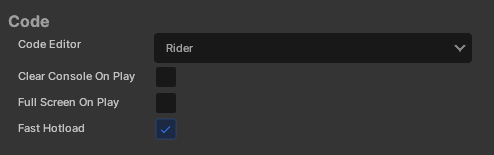
image.png 6.38 KB How does an app stay in beta for years and still not handle basic UI/UX properly? Every UI framework on the planet supports proper keyboard navigation for dropdowns. Did a junior write this engine? Its a multitude of things constantly happening that really puts it into perspective for me this is not even close to something that should have been released at this stage,.It's not a paying users job to find bugs in a released product.
-
Linux support is kind of a new thingYeah its broken, I can't switch to VSCode with keyboard or mouse in the dropdown, so I literally can't do anything, and I'm not going to waste time trying to hack it to work. (I forced a attach to process and vs code updates a little, its still a hack) Whoever made the UI set the event for space but left out the arrow keys for navigation or mouse hit, this isn't specific to wine, tested on windows and basic navigation is not set up.
image.png 6.38 KB
How does an app stay in beta for years and still not handle basic UI/UX properly? Every UI framework on the planet supports proper keyboard navigation for dropdowns. Did a junior write this engine? Its a multitude of things constantly happening that really puts it into perspective for me this is not even close to something that should have been released at this stage,.
It's not a paying users job to find bugs in a released product.
-
The Editor is not supported on Linux, but this isn’t a Linux-specific issue it’s a broader failure in accessibility and input design for a paid developer tool.Open the Editor Settings window and try navigating it using only the keyboard.
Linux support is kind of a new thing


