Linux native editor won't start
Reply on sbox.game-
Nothing happens past the editor's loading screen. I'm running the sbox-dev executable directly since the editor doesn't work through Steam right now. I'm on CachyOS.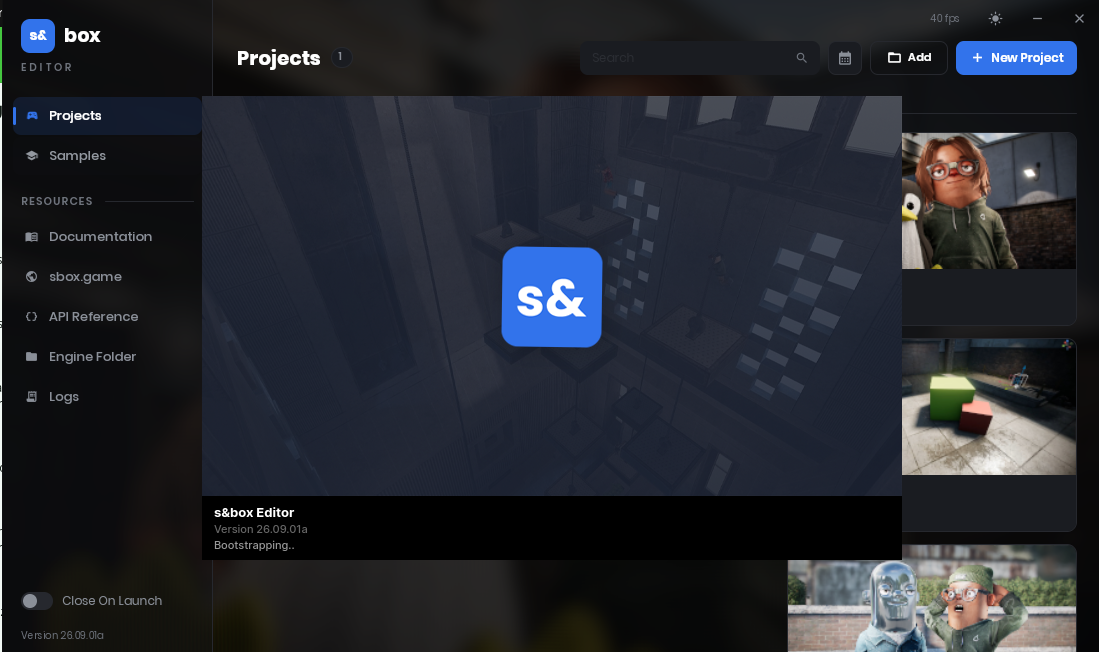
2445c547f79cf32bea77e9206253bfc7978b4a27.png 570.74 KB -
edited:Same. Given a few ties here is a partial stacktrace.
hb_font_create that then goes to libc. So it seems i am missing a font or something like it.PID: 18221 (sbox-dev) TID: 18221 (sbox-dev) UID: 1000 (dauser) GID: 1000 (dauser) Signal: 6 (ABRT) si_code: SI_TKILL Timestamp: Thu 2026-09-03 10:34:23 CST (9s ago) Command Line: /home/dauser/.local/share/Steam/steamapps/common/sbox/sbox-dev /home/dauser/.local/share/Steam/steamapps/common/sbox/sbox-launcher /home/dauser/.local/share/Steam/steamapps/common/sbox/sbox-dev -project $'/home/dauser/Documents/S&box Projects/p/p.sbproj' Executable: /home/dauser/.local/share/Steam/steamapps/common/sbox/sbox-dev Control Group: /user.slice/user-1000.slice/[email protected]/app.slice/[email protected] Unit: [email protected] User Unit: [email protected] Slice: user-1000.slice Owner UID: 1000 (dauser) Boot ID: 0 Machine ID: 0 Hostname: my-arch Storage: /var/lib/systemd/coredump/core.sbox-dev.1000.7bfda6db6ad34d26af0cdff321f45f06.18221.1788402863000000.zst (present) Size on Disk: 294.1M Message: Process 18221 (sbox-dev) of user 1000 dumped core. Module /tmp/mm-exhelper.so.p4aqtN without build-id. Stack trace of thread 18221: #0 0x00007fb15ee256ea abort (libc.so.6 + 0x256ea) #1 0x00007fb15ee26704 n/a (libc.so.6 + 0x26704) #2 0x00007fb15eea456c n/a (libc.so.6 + 0xa456c) #3 0x00007fb15eea4584 n/a (libc.so.6 + 0xa4584) #4 0x00007fa0fc248a80 n/a (libharfbuzz.so.0 + 0x43a80) #5 0x00007fa03b2230d7 hb_font_create (libHarfBuzzSharp.so + 0x230d7) #6 0x00007fb0ea3936e4 n/a (n/a + 0x0) #7 0x00007fb0ea39224f n/a (n/a + 0x0) #8 0x00007fb0ea391e6f n/a (n/a + 0x0) #9 0x00007fb0ea391a6e n/a (n/a + 0x0) #10 0x00007fb0ea391710 n/a (n/a + 0x0) #11 0x00007fb0e9d23446 n/a (n/a + 0x0) #12 0x00007fb0e9d22610 n/a (n/a + 0x0) #13 0x00007fb0e9d2247a n/a (n/a + 0x0) #14 0x00007fb0e59c4eb2 n/a (n/a + 0x0) #15 0x00007fb0e2f0898d n/a (n/a + 0x0) #16 0x00007fb0e2eed612 n/a (n/a + 0x0) #17 0x00007fb0e4de4fcd n/a (n/a + 0x0) #18 0x00007fb0e2eb839c n/a (n/a + 0x0) #19 0x00007fb0e9d1d62e n/a (n/a + 0x0) #20 0x00007fb0e9d1d501 n/a (n/a + 0x0) #21 0x00007fb0e9d1cc14 n/a (n/a + 0x0) #22 0x00007fb0e9d1bd20 n/a (n/a + 0x0) #23 0x00007fb0e709f2e6 n/a (n/a + 0x0) #24 0x00007fb0e7163df0 n/a (n/a + 0x0) #25 0x00007fb0e7170ab7 n/a (n/a + 0x0) #26 0x00007fb0e7163ca1 n/a (n/a + 0x0) #27 0x00007fb0e7163b8a n/a (n/a + 0x0) #28 0x00007fb0de2d1b38 n/a (n/a + 0x0) #29 0x00007fb0e7170756 n/a (n/a + 0x0) #30 0x00007fb0de3edda1 n/a (n/a + 0x0) #31 0x00007fb0de3f1923 n/a (n/a + 0x0) #32 0x00007fb0e07df945 n/a (n/a + 0x0) #33 0x00007fb0e9d1bbf0 n/a (n/a + 0x0) #34 0x00007fb0e7170ab7 n/a (n/a + 0x0) #35 0x00007fb0e9d1baa1 n/a (n/a + 0x0) #36 0x00007fb0e9d1b98a n/a (n/a + 0x0) #37 0x00007fb0de2d1b38 n/a (n/a + 0x0) #38 0x00007fb0e7170756 n/a (n/a + 0x0) #39 0x00007fb0de5257f1 n/a (n/a + 0x0) #40 0x00007fb0de5287f5 n/a (n/a + 0x0) #41 0x00007fb0e07e2894 n/a (n/a + 0x0) #42 0x00007fb0e9c875d0 n/a (n/a + 0x0) #43 0x00007fb0e7170ab7 n/a (n/a + 0x0) #44 0x00007fb0e9c87481 n/a (n/a + 0x0) #45 0x00007fb0e9c8736a n/a (n/a + 0x0) #46 0x00007fb0e624dea5 n/a (n/a + 0x0) #47 0x00007fb0e624c510 n/a (n/a + 0x0) #48 0x00007fb0e71a23db n/a (n/a + 0x0) #49 0x00007fb0e45857cc n/a (n/a + 0x0) #50 0x00007fb0e17334b7 n/a (n/a + 0x0) #51 0x00007fb0df0c6093 n/a (n/a + 0x0) #52 0x00007fb0df0c4809 n/a (n/a + 0x0) #53 0x00007fb0df092a26 n/a (n/a + 0x0) #54 0x00007fb0df09242a n/a (n/a + 0x0) #55 0x00007fb0df091870 n/a (n/a + 0x0) #56 0x00007fb15d5fb0fc n/a (libcoreclr.so + 0x5fb0fc) #57 0x00007fb15d4596f1 n/a (libcoreclr.so + 0x4596f1) #58 0x00007fb15d33fba5 n/a (libcoreclr.so + 0x33fba5) #59 0x00007fb15d33ffec n/a (libcoreclr.so + 0x33ffec) #60 0x00007fb15d36899e n/a (libcoreclr.so + 0x36899e) #61 0x00007fb15d1ca2a6 coreclr_execute_assembly (libcoreclr.so + 0x1ca2a6) #62 0x00007fb15d78c01c n/a (libhostpolicy.so + 0x2f01c) #63 0x00007fb15d78d3e9 corehost_main (libhostpolicy.so + 0x303e9)edited:Starting the app through Rider gave me this with all engine library parts.
We will have to start looking into the engine, to see where the path for the libs get chosen. As it would vary between windows and linux but both should be in the /bin
I am still getting the font crash dump but at this point I guess it is a red herring as it happens after all these failiuers/home/dauser/.local/share/Steam/steamapps/common/sbox/sbox-dev -project "/home/dauser/Documents/S&box Projects/p/p.sbproj" 01:03:12 Generic Hammer is unavailable, its native library didn't load (Failed to load native library 'tools/libhammer.so'. Error Code: 0/2) 01:03:12 Generic ModelDoc is unavailable, its native library didn't load (Failed to load native library 'tools/libmodeldoc_editor.so'. Error Code: 0/2) 01:03:12 Generic Animgraph is unavailable, its native library didn't load (Failed to load native library 'tools/libanimgraph_editor.so'. Error Code: 0/2) [S_API] SteamAPI_Init(): Loaded '/home/dauser/.local/share/Steam/linux64/steamclient.so' OK. Setting breakpad minidump AppID = 590830 SteamInternal_SetMinidumpSteamID: Caching Steam ID: 76561197970772555 [API loaded no] 01:03:12 engine/E SteamAPI_Init succeeded. SteamID is [U:1:10506827] (76561197970772555), AppID is 590830 01:03:12 engine/E failed to dlopen /home/dauser/.local/share/Steam/steamapps/common/sbox/libtier0.so error=/home/dauser/.local/share/Steam/steamapps/common/sbox/libtier0.so: cannot open shared object file: No such file or directory failed to dlopen "/home/dauser/.local/share/Steam/steamapps/common/sbox/libtier0.so" error=/home/dauser/.local/share/Steam/steamapps/common/sbox/libtier0.so: cannot open shared object file: No such file or directory
edited:someone reportet the font bug already> -
Same it crashes after loading a project
-
With the Github issue I was able to find an easy workarround. If you have the editor added as a non-steam game add this to the launch options:
LD_PRELOAD=~/.local/share/Steam/steamapps/common/sbox/bin/linuxsteamrt64/libHarfBuzzSharp.so %command%
Otherwise add it before the exe in a shell.LD_PRELOAD=~/.local/share/Steam/steamapps/common/sbox/bin/linuxsteamrt64/libHarfBuzzSharp.so ./sbox-dev
Have Fun. -
^^ this works but the viewport doesn't react to any inputs for me :/
-
Same and it runs pretty badly
-
viewport doesn't react
It's a known issue, and I hope they fix it soon. -
Do you have a link to the issue?viewport doesn't react
It's a known issue, and I hope they fix it soon.


