
Sbox UI Designer
LibraryVisual UI editor for s&box. Design documents on a canvas, generate clean Razor + SCSS, preview live with one-click

thumb_up
19
open_in_new
View on sbox.game

Visual UI editor for s&box. Design
.sui documents in a paint-based canvas, generate clean Razor + SCSS, and preview live in Play mode with one click. Inspired by UMG (UE/UEFN), built for s&box's PanelComponent + flexbox runtime.What's in V1
- 16 element types: Panel, Text, Image, Button, ProgressBar, Grid, InventoryGrid, InventorySlot, Hotbar, ScrollPanel and more
- Full anchor + pivot system (12 presets including 3 stretch variants)
- Flexbox containers with all properties exposed in the inspector
- One-click Test in Play — compiles and mounts your UI on a real character in a stage scene
- Multi-select, alignment tools, snap-to-grid, marquee, 256-level undo/redo
- 5 sample
Generated code
Outputs hand-editable Razor + SCSS to your project's
Honest scope
V1 ships static UI design + code generation + Test in Play. Data bindings (
Usage
After install: right-click in Asset Browser → New → Sbox UI Document. Double-click the
Quick start
- 16 element types: Panel, Text, Image, Button, ProgressBar, Grid, InventoryGrid, InventorySlot, Hotbar, ScrollPanel and more
- Full anchor + pivot system (12 presets including 3 stretch variants)
- Flexbox containers with all properties exposed in the inspector
- One-click Test in Play — compiles and mounts your UI on a real character in a stage scene
- Multi-select, alignment tools, snap-to-grid, marquee, 256-level undo/redo
- 5 sample
.sui files included (survival HUD, inventory screen, death modal, quest log, loot pickup)Generated code
Outputs hand-editable Razor + SCSS to your project's
Code/ folder. The .User.scss sidecar preserves your custom styles, hovers, and animations across every recompile — your customizations never get overwritten.Honest scope
V1 ships static UI design + code generation + Test in Play. Data bindings (
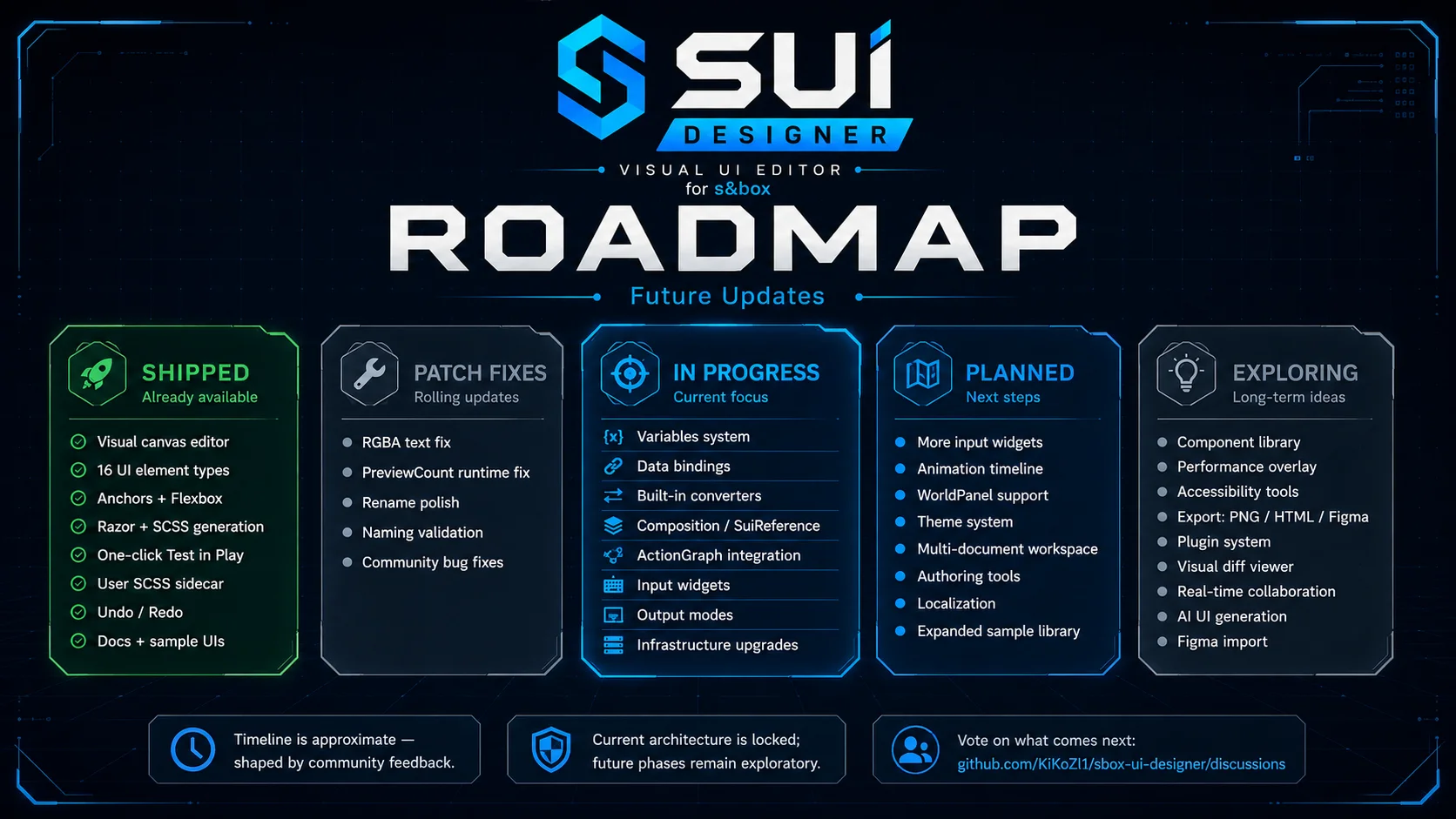
HealthBar ← PlayerStats.Health, UMG ViewModel style) are coming in V1.5, in active development. WorldPanel support and animation timeline are V2.Usage
After install: right-click in Asset Browser → New → Sbox UI Document. Double-click the
.sui file to open the designer window.Quick start
- Install the library — clone this repo into your s&box project's
Libraries/folder, or pull as a published package. Editor picks it up on next launch. - Open the editor in s&box — File → New Project → ensure your
.sbprojreferences the library. - Create your first .sui — right-click in Asset Browser → New → Sbox UI Document. Name it (e.g.
InventoryUI). - Open it — double-click. The Sbox UI Designer window appears.
- Drag elements from the Palette onto the canvas OR click to add them at root.
- Edit properties in the Details panel on the right (anchor, position, size, color, text content, etc.).
Click Compile in the toolbar (or
Ctrl+B). First time: a folder picker asks where the generated files should land (typically Code/UI/ or similar inside your project).The engine hot-loads the new
.razor + .razor.scss — your PanelComponent type is now available to mount in your scene.Use the Preview button to see the live render in a modal without leaving the designer.
Concepts
.suiis the source of truth. All edits go here. The schema is documented at docs/reference/sui-json-schema.md..razor/.razor.scssare generated. Each generated file carries aSUI:GENERATEDheader so the compile pipeline can detect manual edits and refuse to overwrite them.- Manifest tracks ownership.
<output>/.sui-manifest/<DocumentId>.jsonrecords which files this document owns + their hashes at last write. Recompile-with-changes triggers a backup before overwrite, recompile-without-changes is a no-op (Skipped). - Backups are outside
Code/. Backups land in<projectRoot>/.sui-backups/<DocName>/<UTC-timestamp>/...so the engine never compiles them as duplicatepartial classdeclarations. - Preview cache is separate from final output. Preview cache lives at
<projectRoot>/Code/_sui_preview/<ClassName>/and uses a sub-namespace.SuiPreviewto avoid colliding with the final-compiled type.
Sample documents
The Tools menu has Install Sample Documents which writes 4 canonical samples into
Assets/SuiSamples/:simple_panel.sui— minimal panel + centered text. Anchor + pivot basics.inventory_basic.sui— InventoryGrid + 15 InventorySlot composition.hotbar_basic.sui— bottom-anchored Hotbar with 9 slots, first one highlighted.hud_survival.sui— composite top-left HUD with Health / Stamina / Hunger ProgressBars + labels.
Open any of them to see the schema in action.


188
Total Users
243
Total Sessions
1.6 days
Total Playtime
Positive
Negative
How this works: This chart tracks all anonymous thumbs up/down votes, not just the written reviews below. Playtime is permanently recorded at the exact moment the user casts their vote. Data is exactly as returned by the Facepunch API.
8m - 16m
1
0 recorded entries
| Rank | Player | Score | Recorded |
|---|---|---|---|
|
refresh
Discovering package leaderboards...
|
|||
Package ID:
kikozl.sbox_ui_designer
Created:
2026-05-12 23:50 UTC
Updated:
2026-05-14 01:14 UTC
Type:
library
Public:
Yes
Version:
240506
files:
109
Size:
3.4 MB
Engine Version:
25
Asset Version ID:
240506
Version Created:
2026-05-14 01:14 UTC
Hash:
671271770317101708
Manifest: Open manifest
more_horiz Additional Properties
Compiler:
{"RootNamespace":"SboxUiDesigner","DefineConstants":"SANDBOX","NoWarn":"1701;1702;1591;","WarningsAsErrors":"","TreatWarningsAsErrors":false,"Nullables":false,"ReleaseMode":"Release","AssemblyReferences":[],"ReplacementDirectives":[],"IgnoreFolders":[],"DistinctAssemblyReferences":[]}
Live API Passthrough & Removal Notice
This file manifest and asset metadata are retrieved live directly from the official Facepunch s&box public API. s&box Explorer does not host, store, or redistribute any package files. All download links route directly to Facepunch CDN servers.