
HaxeBox
LibraryHaxeBox lets you write code in Haxe that integrates seamlessly with s&box.

thumb_up
4
open_in_new
View on sbox.game
HaxeBox is a library for developing s&box projects with Haxe.
Github repo: https://github.com/lemonsqueezy-lab/HaxeBox
Github repo: https://github.com/lemonsqueezy-lab/HaxeBox
What is included
- Sandbox API support with automatic extern type generation.
- Sandbox attribute support.
- Declarative UI markup directly in Haxe.
- Automatic `haxe` build with toast notifications.
- Hotloading.
Installation
1. Install s&box editor.
2. Install Haxe.
3. Install the Haxe library hxcs (required to compile Haxe to C#).
4. Open s&box Editor.
5. Install HaxeBox via Library Manager.
6. Restart the editor
2. Install Haxe.
3. Install the Haxe library hxcs (required to compile Haxe to C#).
4. Open s&box Editor.
5. Install HaxeBox via Library Manager.
6. Restart the editor
HaxeBox settings
Settings are applied per project. The config file is stored in the project root and is read by the editor plugin.
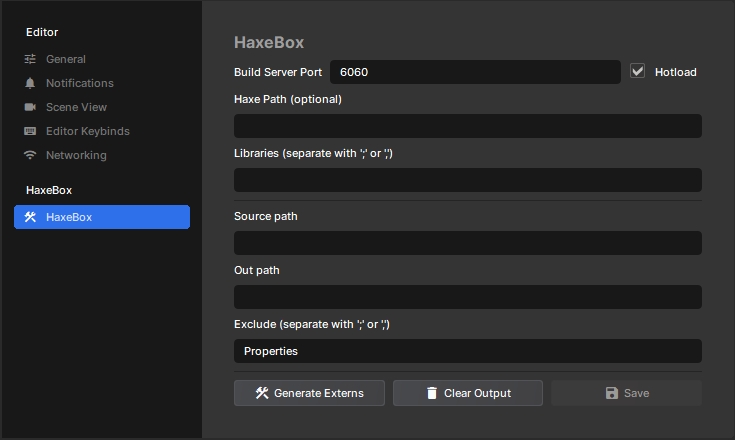
You can change settings in s&box editor preferences (
Edit -> Preferences -> HaxeBox):- Build Server Port - port for
haxe --wait/--connect. - Hotload - enables Haxe file watching and auto-build. Otherwise, build runs when the game starts in editor.
- Haxe Path - path to
haxe(if empty,haxefromPATHis used). - Libraries - Haxe libs for
-lib(separators: ; or ,). - Source Path - folder with Haxe code (default: code).
- Out Path - folder for generated C# code (default: code/__haxe__).
- Exclude - exclusions for
include(...)(separators: ; or ,).
Buttons:
- Generate Externs - generates extern types from runtime.
- Clear Output - deletes generated HaxeBox files.
- Save - saves settings.
Build
In addition to automatic build via hotload or at game start in editor, HaxeBox also runs build when project settings Release Mode, Whitelist, or Define Constants change, and during publish/export in Release mode.
During build, HaxeBox automatically rewrites
During build, HaxeBox automatically rewrites
build.hxml in the project root. Editing build.hxml manually is not useful, but you can still run build manually with haxe build.hxml in terminal.UI markup in Haxe
UI markup is available for classes that inherit directly (or indirectly) from
Such classes support special
sandbox.ui.Panel or sandbox.PanelComponent.Such classes support special
ui metadata (on class level):@:ui.markup(...) generates BuildRenderTree from markup expression(s).@:ui.stylesheet(...) auto-loads stylesheet(s) (StyleSheet.Load / Panel.StyleSheet.Load).@:ui.track(...) generates BuildHash so the panel updates when dependencies change.@:ui.attr (on field/property) marks it as a node attribute, so it can be set from markup (@MyPanel(name = "...")).
@:ui.markup(...) generates BuildRenderTree from markup expression(s).@:ui.stylesheet(...) auto-loads stylesheet(s) (StyleSheet.Load / Panel.StyleSheet.Load).@:ui.track(...) generates BuildHash so the panel updates when dependencies change.@:ui.attr (on field/property) marks it as a node attribute, so it can be set from markup (@MyPanel(name = "...")).Example:
@:ui.stylesheet("styles/Profile.scss")
@:ui.track(name)
@:ui.markup({
	@label name;
})
class Profile extends sandbox.ui.Panel {
	@:ui.attr public var name:String;
}

@:ui.stylesheet("styles/Root.scss")
@:ui.markup({
	@Profile(name = "smoothie") {}
})
class Root extends sandbox.PanelComponent {
}
@:ui.markup syntax@:ui.stylesheet("styles/MyPanel.scss")
@:ui.track(name)
@:ui.markup({
@button(~btn, -"button") @:text "b" + "t" + "n";
for (i in 0...5) {
var img = 'icon$i.png';
@div(-"card", onclick = () -> onCardClick(i)) {
@img(src = 'images/$img', alt = img) {}
@label(-"title") '$name $i';
}
}
})
class MyPanel extends sandbox.ui.Panel {
public var name:String = "player";
}Inside
@:ui.markup(...), a DSL is used with the following rules:- nodes are opened with
@*node type*(for example@div/@button/@img, etc.) - node attributes are listed in parentheses right after node type:
(*key* = *value*, ...). - child nodes are taken from the next expression (or expression block for multiple child nodes).
- to insert text content into a node, wrap expression with
@:textor@:content
For convenience, you can use shortcuts:
~name- shortcut for element reference capture (@ref="name").-"cls-a cls-b"- shortcut forclass =.- Some simple expressions (strings, identifiers, arrays) become text content without wrapping in
@:textor@:content.
Common problems
haxenot found:set
HaxePathin HaxeBox settings.- HaxeBox and project paths are not defined:
build was started with wrong
build.hxmlor without defines added by plugin.- ui.* metadata is ignored because class is not Panel/PanelComponent:
base class must be
sandbox.ui.Panelorsandbox.PanelComponent.- Empty/outdated extern type database:
click
Generate Externsand rebuild project.
No usage statistics available
This package may be new or not widely used yet. Usage data becomes available as more users install and play with the package.
This package may be new or not widely used yet. Usage data becomes available as more users install and play with the package.
0 recorded entries
| Rank | Player | Score | Recorded |
|---|---|---|---|
|
refresh
Discovering package leaderboards...
|
|||
Package ID:
lemonsqueezy.haxebox
Created:
2026-02-02 00:36 UTC
Updated:
2026-02-20 09:38 UTC
Type:
library
Public:
Yes
Version:
154543
files:
102
Size:
1.0 MB
Engine Version:
24
Asset Version ID:
154543
Version Created:
2026-02-20 09:38 UTC
Hash:
-2246059744432715918
Manifest: Open manifest
154543
Feb 20, 2026
Changes on 2026-02-20
153967
Feb 18, 2026
Changes on 2026-02-18
150039
Feb 4, 2026
Changes on 2026-02-04
149812
Feb 3, 2026
Whitelist Patching
Live API Passthrough & Removal Notice
This file manifest and asset metadata are retrieved live directly from the official Facepunch s&box public API. s&box Explorer does not host, store, or redistribute any package files. All download links route directly to Facepunch CDN servers.