Humanoid Hand Retargeter
LibraryRetarget hand and arm animations to custom FPS rigs with automatic mapping, weapon AnimGraph setup.

thumb_up
1
open_in_new
View on sbox.game
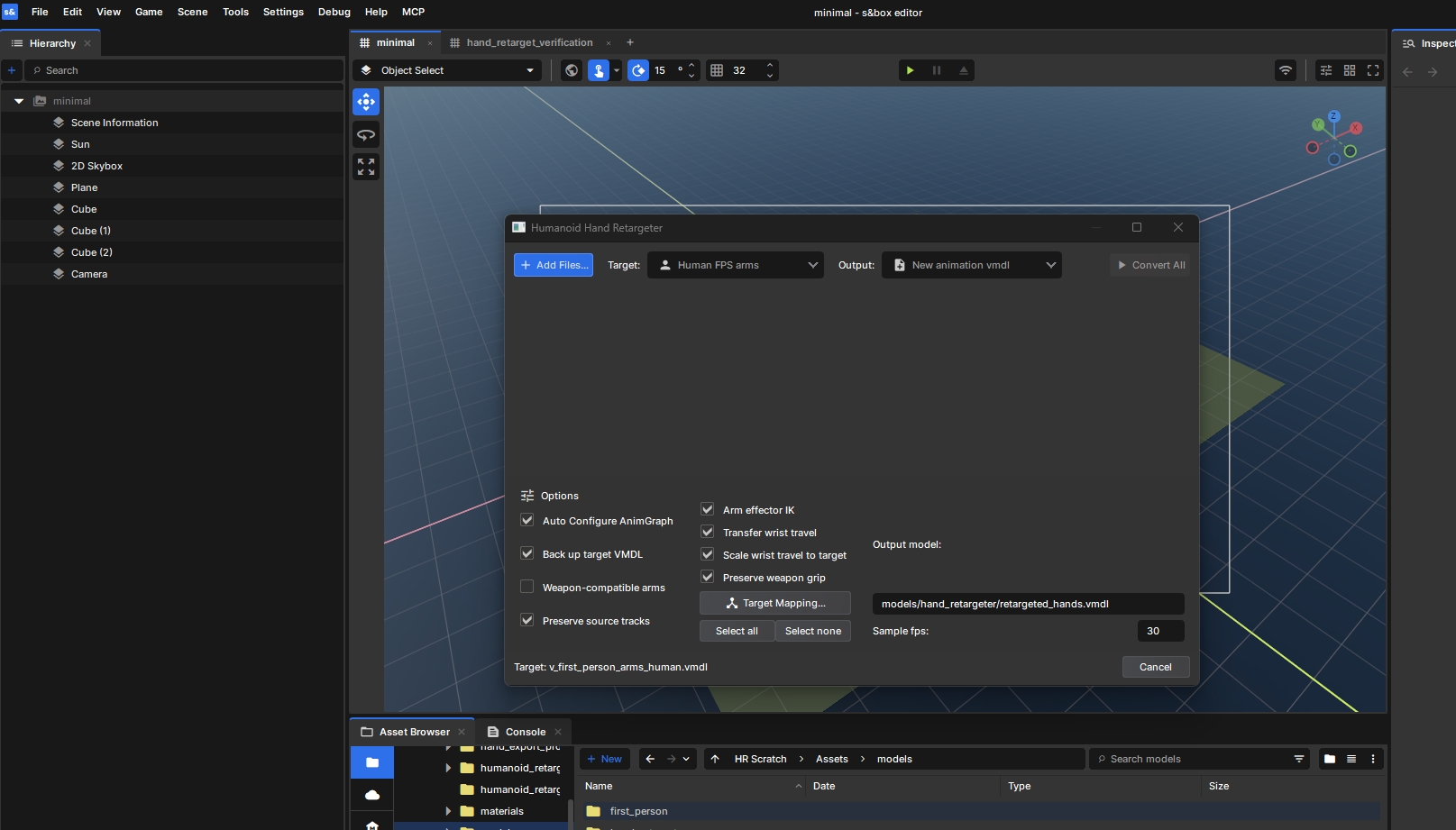
Retarget hand and arm animations onto custom FPS rigs in s&box.
* Automatic rig detection and bone mapping
* Profiles for Citizen, Facepunch Human, ActorCore, Mixamo, Unreal, and more
* First person and third person animation previews
* Weapon grip preservation and elbow IK
* Existing weapon AnimGraph support through generated weapon prefabs
* Automatic AnimGraph setup for sources without a graph
* FBX and VMDL animation sources
Add the library to your s&box project and open the **Humanoid Hand Retargeter** editor dock.
1. Select your target hands or arms.
2. Click **Add Files** and choose your source animations or weapon VMDL.
3. Review any flagged bones in **Hand Mapping**.
4. Preview the animation. Select a weapon model to check the grip.
5. Enable **Auto Configure AnimGraph** if you want weapon graph setup.
6. Choose an output path and click **Convert All**.
Generated weapon prefabs that use an existing AnimGraph still require the original weapon assets. Unrecognized or ambiguous rigs may need manual mapping.
Documentation and source: here.
FAQ:
Do I need to map bones manually?
Supported rigs are detected automatically. Unrecognized or ambiguous bones may need manual mapping.
What does Auto Configure AnimGraph do?
For weapons with an existing graph, it creates a prefab that uses that graph to animate your custom hands through live
retargeting. Otherwise, it generates a basic graph for the converted animations.
Does it copy the weapon’s graph onto my hands VMDL?
No. The existing graph stays on the weapon. Use the generated prefab for the complete live setup.
Do I need to keep the library and original weapon assets?
Yes, when using live retargeting. Exported baked animations do not need the live retargeting component.
Will every custom rig work automatically?
Bone names, proportions, and finger counts vary. Preview the result and check the grip, wrists, and elbows.
Does the AnimGraph provide shooting and ammo logic?
No. It controls animation. Gameplay code handles shooting, ammo, damage, and other weapon behavior.
* Automatic rig detection and bone mapping
* Profiles for Citizen, Facepunch Human, ActorCore, Mixamo, Unreal, and more
* First person and third person animation previews
* Weapon grip preservation and elbow IK
* Existing weapon AnimGraph support through generated weapon prefabs
* Automatic AnimGraph setup for sources without a graph
* FBX and VMDL animation sources
Add the library to your s&box project and open the **Humanoid Hand Retargeter** editor dock.
1. Select your target hands or arms.
2. Click **Add Files** and choose your source animations or weapon VMDL.
3. Review any flagged bones in **Hand Mapping**.
4. Preview the animation. Select a weapon model to check the grip.
5. Enable **Auto Configure AnimGraph** if you want weapon graph setup.
6. Choose an output path and click **Convert All**.
Generated weapon prefabs that use an existing AnimGraph still require the original weapon assets. Unrecognized or ambiguous rigs may need manual mapping.
Documentation and source: here.
FAQ:
Do I need to map bones manually?
Supported rigs are detected automatically. Unrecognized or ambiguous bones may need manual mapping.
What does Auto Configure AnimGraph do?
For weapons with an existing graph, it creates a prefab that uses that graph to animate your custom hands through live
retargeting. Otherwise, it generates a basic graph for the converted animations.
Does it copy the weapon’s graph onto my hands VMDL?
No. The existing graph stays on the weapon. Use the generated prefab for the complete live setup.
Do I need to keep the library and original weapon assets?
Yes, when using live retargeting. Exported baked animations do not need the live retargeting component.
Will every custom rig work automatically?
Bone names, proportions, and finger counts vary. Preview the result and check the grip, wrists, and elbows.
Does the AnimGraph provide shooting and ammo logic?
No. It controls animation. Gameplay code handles shooting, ammo, damage, and other weapon behavior.
No usage statistics available
This package may be new or not widely used yet. Usage data becomes available as more users install and play with the package.
This package may be new or not widely used yet. Usage data becomes available as more users install and play with the package.
0 recorded entries
| Rank | Player | Score | Recorded |
|---|---|---|---|
|
refresh
Discovering package leaderboards...
|
|||
Package ID:
notpointless.chomnr_humanoid_hand_retargeter
Created:
2026-09-05 23:37 UTC
Updated:
2026-09-23 02:20 UTC
Type:
library
Public:
Yes
Version:
394704
files:
66
Size:
0.7 MB
Engine Version:
29
Asset Version ID:
394704
Version Created:
2026-09-23 02:20 UTC
Hash:
1790130049
Manifest: Open manifest
more_horiz Additional Properties
Summary:
Editor tool for humanoid/FPS hand and arm retargeting, preview and validated ModelDoc setup.
394704
Sep 23, 2026
Changes on 2026-09-23
379744
Sep 11, 2026
Changes on 2026-09-11
367848
Sep 6, 2026
Changes on 2026-09-06
367810
Sep 5, 2026
Changes on 2026-09-05
Live API Passthrough & Removal Notice
This file manifest and asset metadata are retrieved live directly from the official Facepunch s&box public API. s&box Explorer does not host, store, or redistribute any package files. All download links route directly to Facepunch CDN servers.