
MCP
LibraryLet AI build in your editor. MCP server with 154 tools for scenes, assets, code and more.

thumb_up
6
open_in_new
View on sbox.game
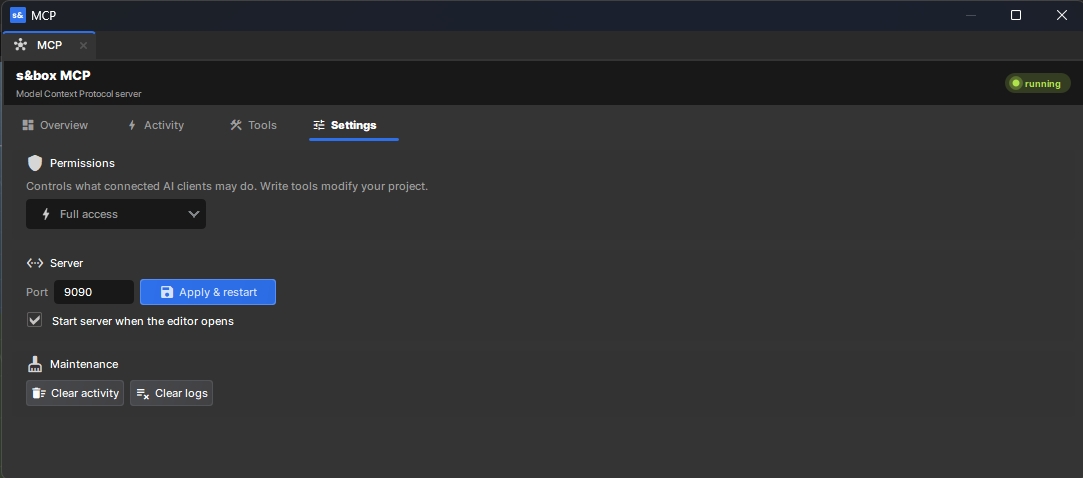
s&box MCP
a Model Context Protocol (MCP) server inside the editor. Install the library, copy your AI client's config
from the MCP menu; that's the whole setup. Works with Claude Code, Claude Desktop, Cursor and VS Code.
154 tools covering:
- Scenes — create, open, save, hierarchy, undo/redo
- GameObjects & components — create, transform, add/remove, set any property
- Prefabs, materials, sound events, textures, input actions
- ModelDoc, AnimGraph, ShaderGraph, ActionGraph authoring
- C#/Razor/SCSS files with hot-reload and compile-error readback
- Cloud asset search & install from sbox.game (opt-in)
- Play mode, console logs, screenshots from any angle
You stay in control:
- Permission modes: full access, approve each write, or read-only
- Live activity feed — right-click any action to revert it; everything is undoable
- Enable/disable any tool; import public methods from your other libraries as new tools
from the MCP menu; that's the whole setup. Works with Claude Code, Claude Desktop, Cursor and VS Code.
154 tools covering:
- Scenes — create, open, save, hierarchy, undo/redo
- GameObjects & components — create, transform, add/remove, set any property
- Prefabs, materials, sound events, textures, input actions
- ModelDoc, AnimGraph, ShaderGraph, ActionGraph authoring
- C#/Razor/SCSS files with hot-reload and compile-error readback
- Cloud asset search & install from sbox.game (opt-in)
- Play mode, console logs, screenshots from any angle
You stay in control:
- Permission modes: full access, approve each write, or read-only
- Live activity feed — right-click any action to revert it; everything is undoable
- Enable/disable any tool; import public methods from your other libraries as new tools
1
Total Users
1
Total Sessions
5 min
Total Playtime
0 recorded entries
| Rank | Player | Score | Recorded |
|---|---|---|---|
|
refresh
Discovering package leaderboards...
|
|||
Package ID:
notpointless.chomnr_mcp
Created:
2026-06-12 18:06 UTC
Updated:
2026-09-04 12:53 UTC
Type:
library
Public:
Yes
Version:
367408
files:
55
Size:
0.4 MB
Engine Version:
29
Asset Version ID:
367408
Version Created:
2026-09-04 12:53 UTC
Hash:
1788526432
Manifest: Open manifest
more_horiz Additional Properties
Summary:
MCP server inside the s&box editor. Connect Claude Code, Cursor, Claude Desktop or VS Code and let AI drive scenes, assets, ModelDoc, AnimGraph, ShaderGraph, ActionGraph and more.
Description:
Install this library, open the MCP dock (View → MCP), copy the config for your AI client — done. Exposes ~60 editor tools over the Model Context Protocol with a live activity feed, tool browser and permission modes.
Public:
true
367408
Sep 4, 2026
Changes on 2026-09-04
311798
Jul 18, 2026
Changes on 2026-07-18
308753
Jul 10, 2026
Changes on 2026-07-10
306146
Jul 4, 2026
Changes on 2026-07-04
280401
Jun 12, 2026
Changes on 2026-06-12
Live API Passthrough & Removal Notice
This file manifest and asset metadata are retrieved live directly from the official Facepunch s&box public API. s&box Explorer does not host, store, or redistribute any package files. All download links route directly to Facepunch CDN servers.