Vizalok Survival ; ALPHA W.I.P!
GameVizalok-Survival - EARLY WIP – PLEASE READ BEFORE PLAYINGThis is a work-in-progress project. It is not finished, polished,
95
Total Users
167
Total Sessions
13.2 hours
Total Playtime
Positive
Negative
How this works: This chart tracks all anonymous thumbs up/down votes, not just the written reviews below. Playtime is permanently recorded at the exact moment the user casts their vote. Data is exactly as returned by the Facepunch API.
1m - 2m
4
2m - 4m
1
8m - 16m
3
16m - 32m
2
32m - 1.1h
1
4.3h - 8.5h
1
17.1h - 34.1h
1
0 recorded entries
| Rank | Player | Score | Recorded |
|---|---|---|---|
|
refresh
Discovering package leaderboards...
|
|||
Package ID:
vizalok.vizalok_survival
Created:
2026-07-09 09:24 UTC
Updated:
2026-08-17 00:42 UTC
Type:
game
Public:
Yes
Version:
342473
files:
2,280
Size:
2,131.1 MB
Engine Version:
28
Asset Version ID:
342473
Version Created:
2026-08-17 00:42 UTC
Hash:
1792251370
Manifest: Open manifest
Multiplayer:
No
Versus:
Unknown
Co-op:
Unknown
sports_esports Input & Control Support
Keyboard & Mouse
cancel Unsupported
Controller / Gamepad
cancel Unsupported
Virtual Reality (VR)
cancel Unsupported
settings Engine & Multiplayer Configuration
Player Count:
1 - 64 Players
Tick Rate:
50 Hz
Network Type:
Multiplayer
Launch Mode:
QuickPlay
Startup Scene:
scenes/orbit_hub.scene
Map Select:
Unrestricted
more_horiz Additional Properties
Dedicated Server Startup Scene:
scenes/orbit_hub.scene
Hanging through bad start : solo Dev not complaining , being realistic.
Aug 12, 2026
Fixed
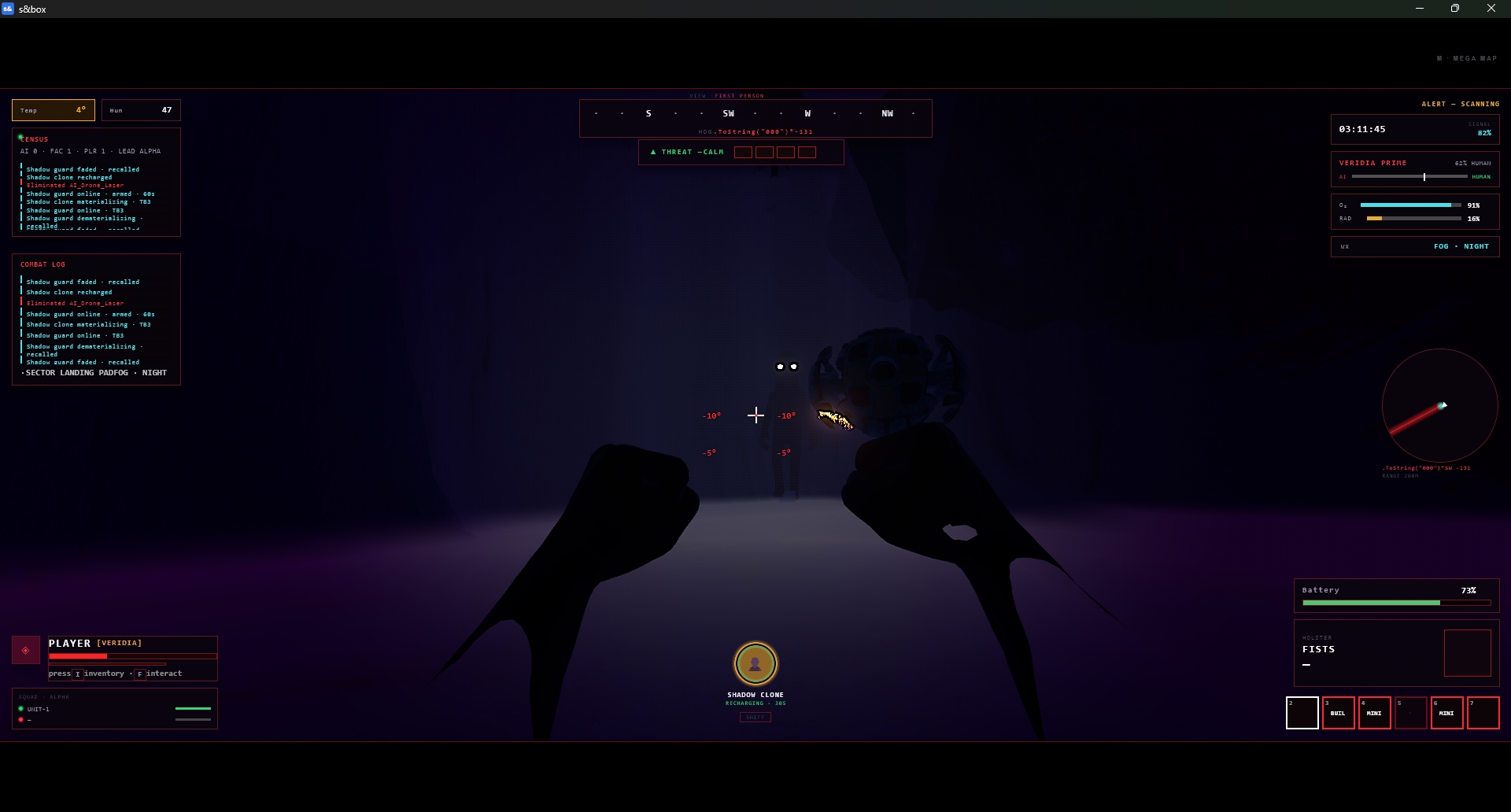
- Veridia — HUD Overhaul Devlog
- A full rework of the in-game HUD, moving from a cluttered center-stacked layout to a modular, edge-anchored, visor-style interface with dedicated first-person and third-person presentations.
- Layout & Structure
- Split-edge redesign — HUD elements moved off the center of the screen and onto the true edges/corners, keeping the player's sightline clear.
- Visor-frame treatment — added a soft inset vignette around the screen so the HUD reads as viewed through a helmet visor, not floating on raw screen space.
- Componentized panels — the HUD is no longer one monolithic panel. Every element (compass, threat meter, reticle, pitch ladder, minimap, vitals, sector info, alerts, companion status, weapon loadout, hotbar, inventory) is now its own independent panel, each anchored with resolution-independent percentage-based positioning.
- New HUD Elements
- Compass strip — scrolling heading display, top-center, tracks camera yaw in real time.
- Threat level meter — 5-segment color-coded danger indicator (Calm → Guarded → Elevated → High → Critical), positioned under the compass.
- Pitch ladder — degree-scale tick marks flanking the reticle so players can read how far up/down they're aiming.
- Reinforced reticle — crosshair now sits inside a clean circular ring, isolated on its own top layer.
- Sector panel — objective/zone info repositioned under the vitals cluster for a cleaner read.
- Inventory & Hotbar
- On-demand inventory — inventory is no longer always visible; it now opens/closes on the I key as its own overlay panel.
- Hotbar relocated — now docked directly beneath the weapon loadout display instead of floating independently.
- Image icon slots — both the inventory grid and hotbar now support fixed-size icon containers for weapon/item art, with placeholder states for empty slots.
- First-Person vs. Third-Person
- Mode-aware rendering — the HUD now branches by camera mode:
- First person: flat screen-anchored panels (compass, threat meter, reticle, pitch ladder, vitals, etc.)
- Third person: a floating, camera-billboarded vitals panel anchored beside the character's chest, replacing the flat overlay.
- Helmet-frame tuning — first-person panel offset and scale precisely tuned so it sits tight against the frame instead of floating mid-world.
- Chest-anchored tuning — third-person panel offset/scale tuned for a natural floating position beside the character.
- FOV-aware scaling — fixed distortion/oversizing caused by perspective (FOV) affecting world-space panels at close camera distances.
- Animation & Feedback Polish
- Compass and pitch ladder motion smoothed to avoid jitter on fast camera turns.
- Threat meter segments transition smoothly and pulse at Critical level.
- Reticle flashes on hits and pulses on taking damage.
- Vitals values animate with a brief count-up/down instead of snapping.
- Alerts fade and slide in from the edge, then auto-dismiss.
- Companion status cross-fades between ready/engaged/down states.
- Ammo counter flashes at zero; reload triggers a fill-sweep animation.
- Hotbar active-slot highlight slides smoothly between selections.
- Inventory overlay fades and scales in/out, dimming the rest of the HUD while open.
- Low-HP state triggers a subtle full-screen red vignette pulse.
- Bug Fixes
- Fixed missing InventoryHud reference causing the inventory to open/close internally without ever rendering content.
- Fixed WorldPanel drifting mid-world instead of anchoring correctly to the helmet frame.
- Fixed oversized, washed-out panel appearance caused by close-camera FOV distortion.
Known Issues
- Combining Rust + Destiny 2 — the design goal
- The two games solve very different problems, and pairing them plugs each one's weak spot with the other's strength:
- Rust gives you the survival tension — scarcity, hunger, temperature, base-building, PvP stakes, the feeling that the world doesn't care if you die. That's exactly what your vitals cluster (HP/ARM/HUN/TMP) and threat meter are built around. It's mechanically deep but famously rough — punishing onboarding, ugly/utilitarian UI, no real sense of progression identity.
- Destiny 2 gives you the presentation layer and the social/meta structure — a polished, diegetic visor HUD, a persistent social hub (Orbit/Tower) where players gear up between activities, companion systems, weapon loadouts with real character, and a sense of becoming something through gear and ritual.
- So the goal is: Rust's survival stakes, wrapped in Destiny's sense of identity and ritual. Concretely that means:
- The orbit_hub acts like Destiny's Tower/Orbit — a safe social staging area where players manage loadout, inventory, and companions before dropping into a harsh Rust-like survival zone.
- The HUD borrows Destiny's visor framing and diegetic feel (compass, pitch ladder, threat meter) instead of Rust's flat utilitarian boxes, so the survival mechanics feel earned and cinematic rather than spreadsheet-y.
- Progression and gear (weapon icons, companion status) get Destiny-style visual weight, while the underlying systems (hunger, temperature, scarcity, threat) stay Rust-hard.
- Basically: Rust's rules, Destiny's feel.
- People getting stuck in orbit_hub
- That's worth digging into before it becomes a launch blocker. A few common causes for players getting stuck in a social/staging hub scene like this:
- A transition trigger (hub → game) that requires an input or panel state that silently fails to register — similar to the InventoryHud missing bug you already found, this pattern (state machine references a panel/object that isn't mounted) could easily also affect a "ready up" or "deploy" trigger.
- Spawn/deploy button gated behind a loading state that never resolves (e.g. waiting on an async load that throws silently).
- Invisible collision or barrier objects (you have Map_Barrier_North/South/East/West in your hierarchy) that might be misconfigured in the hub scene and physically trapping players.
- Input focus getting stuck in a UI panel (like the Phone/Build UI or Inventory) that doesn't release mouse/keyboard control back to the player.
Live API Passthrough & Removal Notice
This file manifest and asset metadata are retrieved live directly from the official Facepunch s&box public API. s&box Explorer does not host, store, or redistribute any package files. All download links route directly to Facepunch CDN servers.
-
1 posts 21 views
-
1 posts 20 views
-
1 posts 21 views
