
Ozmium MCP Server
LibraryConnect AI coding assistants to your S&box editor in real time — 31 MCP tools for reading, writing, and controlling your scene w

thumb_up
8
open_in_new
View on sbox.game
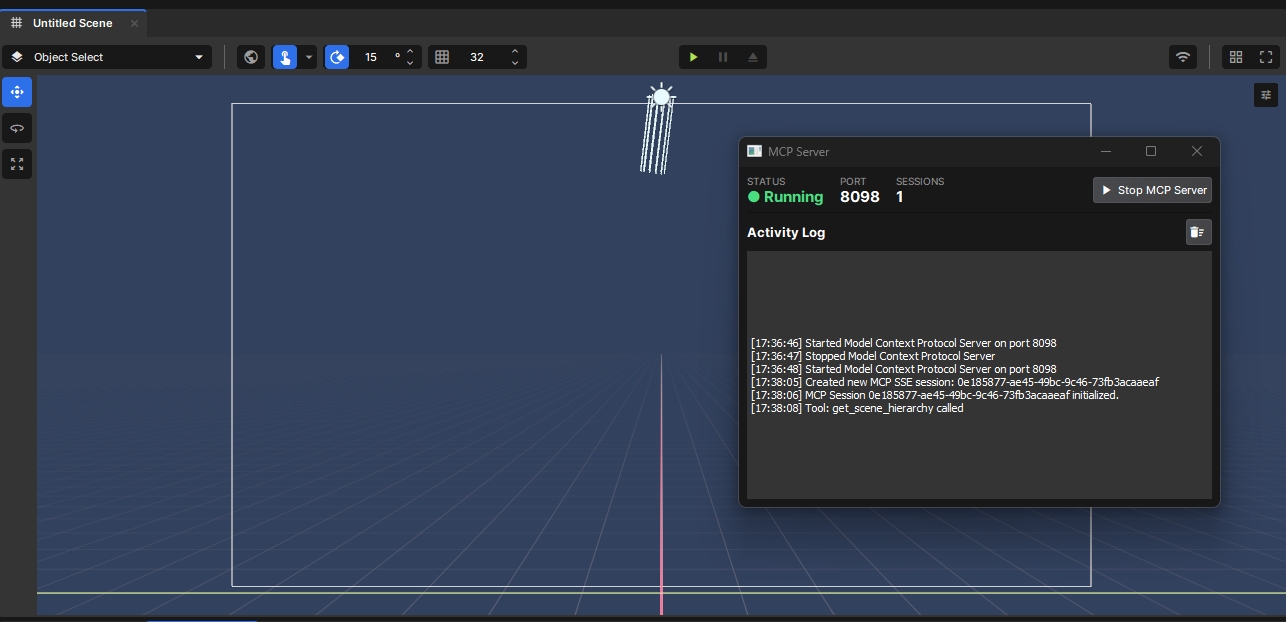
Ozmium MCP Server bridges your AI coding assistant and the S&box editor using the Model Context Protocol. Your AI can see and manipulate everything in the editor — live, in real time, with zero copy-pasting.
What can your AI do with this?
🔍 Read your scene — Query GameObjects by name, tag, component, path, or spatial radius. Inspect any component's runtime property values. Get a full scene summary or walk the hierarchy.
✏️ Edit your scene — Create and destroy GameObjects, add/remove components, set property values (string, bool, int, float, Vector3, enum), reparent objects, manage tags, instantiate prefabs, and save.
📦 Browse your assets — Search models, materials, prefabs, sounds by type or name. Inspect model bones and attachments, read material shaders, view prefab structures, and force-reimport assets.
🎮 Control the editor — Start/stop play mode, select objects in the hierarchy, open assets in their editor, read the editor log, enumerate and set console variables, undo/redo.
Key Features
- 31 tools covering scene read, scene write, asset queries, editor control, and console access
- Disabled-object aware — custom recursive walker finds objects inside disabled subtrees (unlike
GetAllObjects) - Built-in Editor UI — live status, session count, and activity log via
Editor → MCP → Open MCP Panel - Localhost-only SSE transport on port
8098— lightweight, secure, nothing leaves your machine - Error-safe — all tools return errors as text content, never crashing the SSE connection
Setup
- Install — add Ozmium MCP Server via the S&box Library Manager
- Open the panel —
Editor → MCP → Open MCP Panel - Start the server — click Start MCP Server (status turns green)
- Connect your AI — add to your MCP config:
json

{
 "mcpServers": {
   "sbox": {
   "url": "http://localhost:8098/sse",
 "type": "sse"
  }

  }

}- Done. Your AI assistant now has full access to all 31 tools.
54
Total Users
606
Total Sessions
6.9 days
Total Playtime
0 recorded entries
| Rank | Player | Score | Recorded |
|---|---|---|---|
|
refresh
Discovering package leaderboards...
|
|||
Package ID:
ozmium.oz_mcp
Created:
2026-03-18 00:48 UTC
Updated:
2026-03-26 17:23 UTC
Type:
library
Public:
Yes
Version:
166436
files:
318
Size:
53.0 MB
Engine Version:
24
Asset Version ID:
166436
Version Created:
2026-03-26 17:23 UTC
Hash:
1791471433
Manifest: Open manifest
more_horiz Additional Properties
Compiler:
{"RootNamespace":"Sandbox","DefineConstants":"SANDBOX","NoWarn":"1701;1702;1591;","WarningsAsErrors":"","TreatWarningsAsErrors":false,"Nullables":false,"ReleaseMode":"Release","AssemblyReferences":[],"ReplacementDirectives":{".Server.cs":"SERVER"},"IgnoreFolders":[],"DistinctAssemblyReferences":[]}
166436
Mar 26, 2026
Changes on 2026-03-26
166417
Mar 26, 2026
Changes on 2026-03-26
163552
Mar 20, 2026
Changes on 2026-03-20
163225
Mar 19, 2026
Changes on 2026-03-19
163220
Mar 18, 2026
Changes on 2026-03-18
163202
Mar 18, 2026
Changes on 2026-03-18
163180
Mar 18, 2026
Changes on 2026-03-18
163008
Mar 18, 2026
Changes on 2026-03-18
162931
Mar 18, 2026
Changes on 2026-03-18
Live API Passthrough & Removal Notice
This file manifest and asset metadata are retrieved live directly from the official Facepunch s&box public API. s&box Explorer does not host, store, or redistribute any package files. All download links route directly to Facepunch CDN servers.